# Reports

The report is the main function of the game. It can be used to get the last informations about your player, since the last interaction. You can ask for a report by executing the `/report` command.

### Interface :

The report command has 4 differents states :

* The player is travelling.
* The player has a [state alteration](/en/notions-principale/alterations-detat.md).
* The player is doing an event.
* The player is doing a mini event.

<figure><img src="/files/0del4oIDjb7nwn1wdZar" alt=""><figcaption><p>Command interface when the player is travelling</p></figcaption></figure>

### Mini events :&#x20;

The player takes circa 9 minutes and 45 seconds to travel between 2 mini events.

<figure><img src="/files/fOBDsnFOsa5L7vAx5Zrw" alt=""><figcaption><p>A mini event example</p></figcaption></figure>

A mini event is mostly a short sentence. However, some can give you items, health or even money.

{% hint style="info" %}
Each mini event gives the player a quantity of points which decreases at each mini event. These points are added to the total number of points earned at the next event.
{% endhint %}

<figure><img src="/files/J6qnhnCaeSBkdMYWdqhc" alt=""><figcaption><p>Once the mini event finished, it appears on the tavelling interface</p></figcaption></figure>

You can see the number of points earned with the mini events and the waiting time before the next one.

### Events :&#x20;

The events are the core of the game, the player just needs to react to a multiple-choice situation with the Discord reactions. Acoording to his choice, different endings can occur.

<figure><img src="/files/IxB0D4eYFzH6cSoPr8vp" alt=""><figcaption><p>An event example</p></figcaption></figure>

In this example above, the player has 3 different choices : the 2 reaction choices and also the possibility to add no reaction to it.

{% hint style="info" %}
The non-choice "do nothing" happens automatically 2 minutes after no explicit choices were given. You can force this non-choice by manually adding the :end:(:end:) reaction to the event's text.
{% endhint %}

{% hint style="success" %}
In some events, doing nothing is the best choice ! (In others, it's the worst)
{% endhint %}

Once the player has set their mind on what to choose, he can press a reaction (or wait 2 minutes), which triggers the issue.

<figure><img src="/files/g2LTV0a9GiIxl00Lrt3q" alt=""><figcaption><p>An issue example</p></figcaption></figure>

### Destination :&#x20;

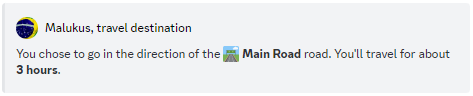
After an event, the player is led to choose a destination. It is not possible for a player to go back on their steps (unless it is the only possible choice).

<figure><img src="/files/Fwo508sEnoyK2wTWIdPl" alt=""><figcaption><p>Example of a destination choice</p></figcaption></figure>

The time indicated in parenthesis is the travel time to reach the location, a question mark means that the time is unknown.

<figure><img src="/files/Zq9WAcEtJAmau4x9C2gz" alt=""><figcaption><p>Here is your information about your destination.</p></figcaption></figure>


---

# Agent Instructions: Querying This Documentation

If you need additional information that is not directly available in this page, you can query the documentation dynamically by asking a question.

Perform an HTTP GET request on the current page URL with the `ask` query parameter:

```
GET https://guide.crownicles.com/en/notions-principale/report.md?ask=<question>
```

The question should be specific, self-contained, and written in natural language.
The response will contain a direct answer to the question and relevant excerpts and sources from the documentation.

Use this mechanism when the answer is not explicitly present in the current page, you need clarification or additional context, or you want to retrieve related documentation sections.